Keys
The keyboard has 4 rows × 14 columns in four blocks, each with its own colour and role; every key has a single-colour light that tells you what it can do right now. There is also a HOME key on the side, which the groovebox leaves unused.
- 1ESC: scenes
- 2TAB: tracks
- 3FN: the menu of this screen
- 4CTRL: pages
- 5PADS: play
- 6GRID 4×4
- 7Plus, minus, confirm
- 8Play
Key map
The board itself: every key, the HOME key on the side and the parts of the screen tell what they do.
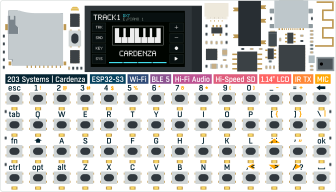
Left keys: ESC TAB FN CTRL
All four keys work the same way: a tap does one thing, a hold shows a map:
| Key | Tap | Hold |
|---|---|---|
| ESC | walks the scenes 1 INSTR → 2 SEQ → 3 TAPE; in 0 SETUP goes back; cancels in a pop-up | scene map: the GRID's four columns = the four scenes, column 1 = 0 SETUP |
| TAB | next track T1 DRUMS → T2 JUNO → T3 DX7 → T4 SAMPLER | track map: select, mute, solo, sequencer on |
| FN | opens / closes the menu of this screen | the FN menu and second functions, see The FN menu; in input screens the yellow legends, see FN in input screens: the yellow legends |
| CTRL | next page | page map: every page of the current scene |
- 10 SETUP: only from here
- 21 INSTR
- 32 SEQ (current)
- 43 TAPE
- 5ESC held
- 6Hold
- 7Scenes: current fully lit, others half lit
The four strips on the screen's left edge are these four keys (top to bottom: ESC red-orange, TAB cyan, FN yellow, CTRL violet), each with its icon. Where you are is in the status line and the page tabs, not in the strips:
| Strip | Icon | Shows |
|---|---|---|
| ESC | back arrow | half lit: always works (scenes, back, cancel) |
| TAB | tab arrow | off in a pop-up; after a track change only the strip of the new track's row lights for a moment (T1 = ESC … T4 = CTRL) |
| FN | menu | fully lit while the menu is kept open |
| CTRL | pages | off when the screen has a single page or a pop-up is open |
A held key fills its strip from the bottom.
Right keys: ADD SUB OK PLAY
- 1Plus / minus (hold to repeat)
- 2Confirm · record key
- 3Play / stop
| Key | Cap | Does |
|---|---|---|
| ↑← | del | increase; up in a list; held it repeats, faster and faster |
| ↓SUB | \ | decrease; down in a list |
| ↵OK | ↵ Enter | confirm, run, switch; on the SEQ note page it is the record key: a tap switches ROLL / STEP, a hold (0.45 s) opens the RECORD panel |
| ▶PLAY | space | play / stop; FN+▶PLAY arms / disarms live recording |
- With TAB held, ↑← / ↓SUB pick the next / previous track; with CTRL held, the next / previous page.
- The icons on the right strips say what ADD and SUB do on this screen: + −, ↑ ↓ in a list, → ← sideways (steps, the engine picker).
In text entry the top key (the del cap) erases.
The PADS
The 4×8 keys in the middle always play the current track, whatever scene or page you are on. Except: while you hold ESC, TAB or CTRL (a map, the pads are silent), while you hold FN (letters and quick controls, see Second functions (letters and the keys around)), while you hold a parameter cell (the pads are its values) and in the preset and sample lists (silent; search is FN + F).
Drum track T1 DRUMS: each column is one drum: kick, snare, closed hat, open hat, clap, tom, cowbell, maracas. The row says how hard: the top row hardest, the bottom row softest.
Melodic tracks (PIANO layout): two whole octaves, rows 2 and 4 white keys, rows 1 and 3 black keys; C3 at the bottom left, the upper two rows an octave up. See Keyboard layouts.
In text entry the whole keyboard types the characters on its caps.
The GRID
The 16 keys of the 4×4 on the right = the 4×4 cells in the middle of the screen. What is drawn on the screen is what the key does:
Sequencer: 16 cells = 16 steps. A pattern can be up to 256 steps; the GRID shows one page of 16 at a time.
Instrument pages: 16 cells = 16 parameters; tap one to select it.
MIX: each column is one track's select, mute, solo and sequencer switches.
While a left key is held the GRID becomes that key's "map", see Hold a left key = a map.
HOME side key
The HOME key on the side does nothing in the groovebox. Stop all is FN+ESC: it stops the sequencer and silences everything that is sounding (stuck notes and every ARP included), and the screen says ALL STOP.
Switching apps is the job of the device's own launcher.
One rule for everything
| Rule | |
|---|---|
| HOLDESC HOLDTAB HOLDCTRL | While a left key is held, choose on the GRID. Each cell of a map sits on the key that picks it |
| HOLDFN | While FN is held, no key does its usual job: the GRID is the menu, keys with an FN function do only that (lit), the others do nothing (off) |
| A modifier that was used in a combination does not also fire its tap when released | |
| A hold is 250 ms (OK on the SEQ note page: 0.45 s); ↑← / ↓SUB start repeating after 0.4 s and move 5 at a time after 12 repeats |